
Record Activity Widget
The Activity widget displays a real-time feed of record changes within a single App. Unlike the admin-only Activity Log, this widget can be embedded on any dashboard and shared with all users, making it ideal for team transparency, audit trails, and monitoring updates at a glance.
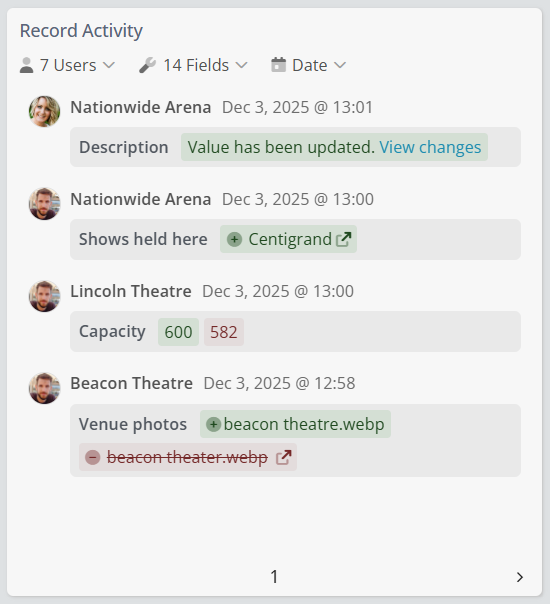
Adding the Record Activity Widget
- Open your target Dashboard.
- Click Add Widget in the Dashboard drop down.
- Select Record Activity from the widget list.
- Choose the App to monitor (only one App can be selected).
- Configure your filters (detailed below).
- Click Done, your live activity stream is now active!
Tip: Use multiple Activity widgets on the same dashboard to monitor different Apps side by side (e.g., "Tasks" and "Invoices")
Record Activity Widget Settings
Fine-tune exactly what appears in your feed using these powerful filters:
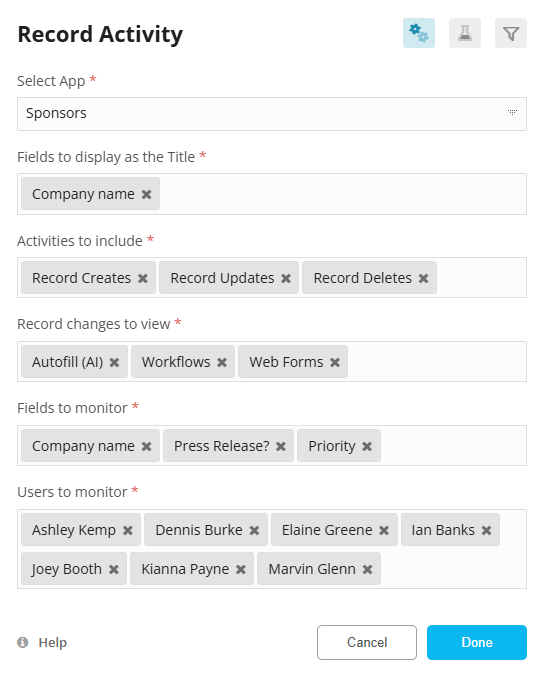
| Setting | Description |
|---|---|
| Select App (Required) | Choose the single App to monitor. Only one App can be selected per widget. |
| Activities to Include |
Toggle which events appear: • Record created • Record updated • Record deleted • Record restored |
| Record Changes to View |
Filter by how the change was made: • Manual updates (user edits) • API • Autofill (AI) • Imports • Web Forms • Automated Workflows |
| Fields to Monitor (Required) |
Select specific fields to track changes on. At least one field is required. Use “All Fields” to log every edit. |
| Users to Monitor | Narrow the feed to changes made by specific team members (or leave blank for everyone). |
Tip: Combine Fields to Monitor with Record Changes to View to create audit-focused widgets — e.g., track only Status changes made via Workflows.